Confluence and Jira replacement

Replace Confluence and Jira with one connected workspace.

Bring your Confluence content with you, then connect documentation, projects, files, requirements and traceability on one platform.

Self-hosted or managed. Confluence import built in. No automatic Jira project migration.

Confluence and Jira integrate. They are still separate systems.

Confluence and Jira work well together, and Atlassian provides links and embedded Jira views inside Confluence.

But documentation and work items still live as different objects in different applications.

swCollab takes a different approach: pages, projects, tasks, files, requirements, tests, risks and decisions live on the same underlying platform.

Atlassian centralises organisation and user administration, but Jira and Confluence remain distinct applications with their own project/space configuration and permission models.

swCollab uses one workspace model for pages, records and files, with additional cryptographic protection available for Restricted and Sealed Spaces. See Security →

Integration is useful. A shared data model goes further.

Confluence + Jira

Confluence Jira Confluence page Jira issue link / embed Two applications, two data models.

The two objects remain owned by different applications.

swCollab

shows live references implements verifies references relates to Page Task Requirement File Test Every link is stored and typed.

All are part of one workspace.

The difference isn't whether one product can display information from another. The difference is whether documentation, delivery and traceability are designed as one system.

Multiple systems and data models become one connected workspace.

A common project setup

Confluence Documentation own data · own search · own permissions Jira Delivery tracking own data · own search · own permissions Shared storage Project files own data · own search · own permissions Spreadsheets, specialist tools Requirements, risks, traceability own data · own search · own permissions

Four systems. Four data models.

swCollab

One workspace Documentation Projects and tasks Files and libraries Requirements Tests Risks and decisions Traceability One data model one search · one permission system

One workspace. One search. Connected records.

Documentation that stays connected to the work.

Stop writing status reports about your project. Show the project itself.

Traditional project documentation often becomes a snapshot of the project at the moment somebody wrote it.

In swCollab, pages can contain live project information.

A page can show current tasks, requirements, risks or other structured records without manually copying the data into the document.
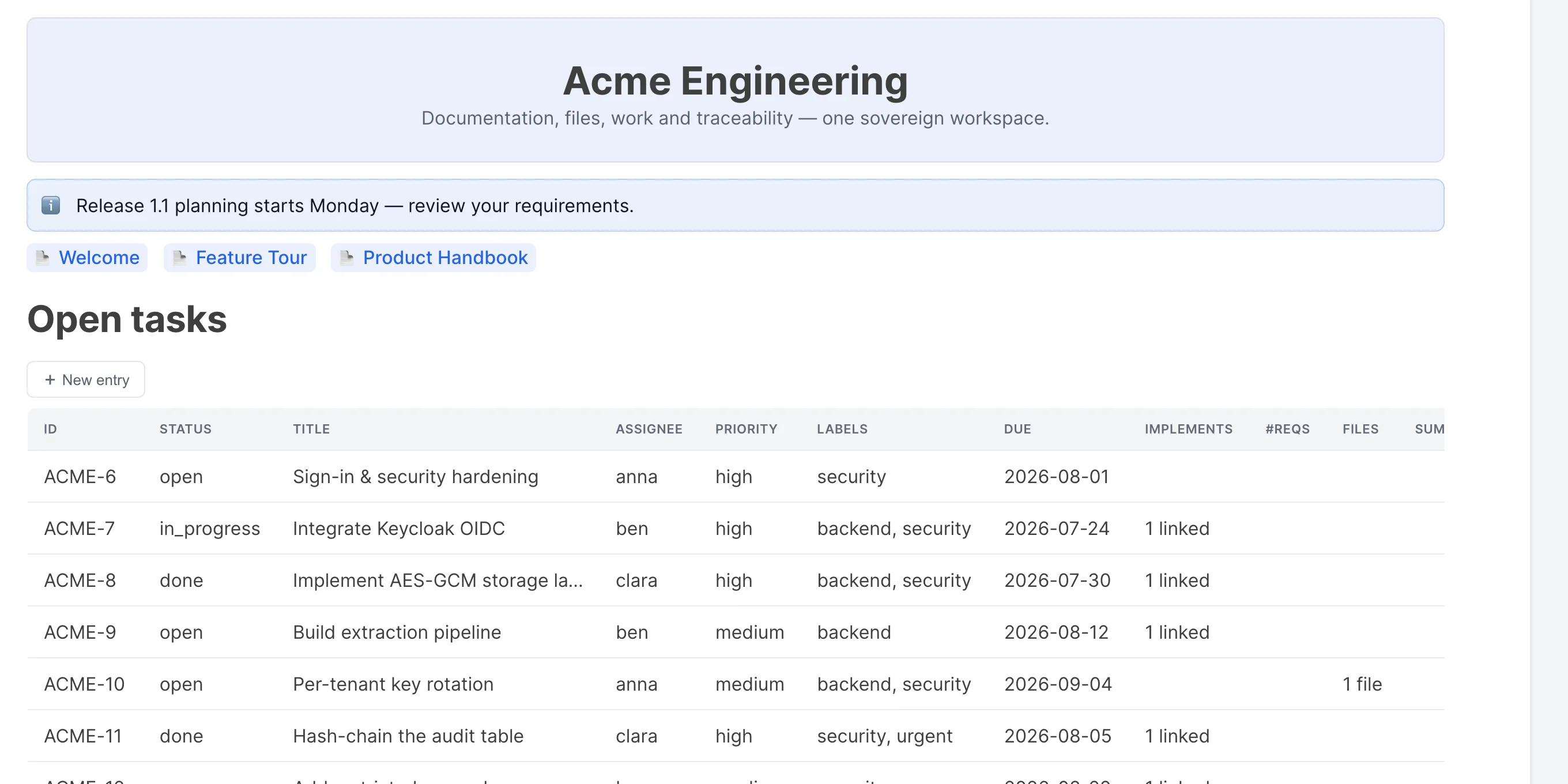
A swCollab page with an embedded live view of open tasks

Go beyond documentation and issue tracking.

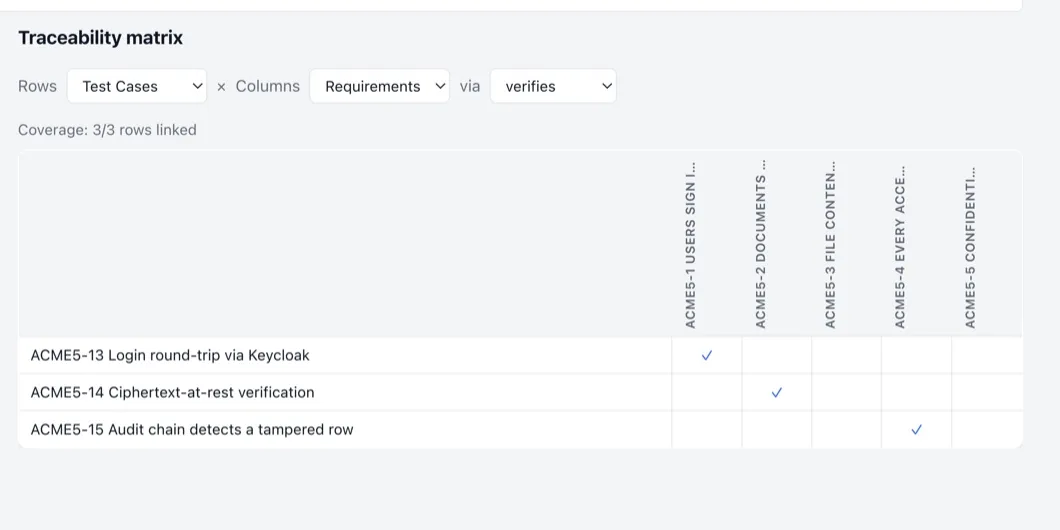
Build traceability while you work — not before the audit.

Requirements and test traceability are part of the workspace.

Requirement → Implementation → Test → Evidence

Relationships are created as work happens.

Specialist requirements and traceability capabilities typically require additional tooling or configuration in a Confluence/Jira environment.

Traceability matrix of test cases against requirements, with coverage shown

That allows teams to answer questions such as:

  • Has every requirement been implemented?
  • Has every requirement been tested?
  • Which tests verify this requirement?
  • Which implementation is affected if this requirement changes?
  • What evidence supports this release?

One set of records. Different views for different people.

One project. Different views. No duplicate data.

  • Team Board
  • Project manager Gantt / timeline
  • Analyst Table
  • Stakeholder Dashboard/chart
  • Planner Calendar

These are different views of the same records, not separate copies of the project plan.

Change a date in one view and the same record changes everywhere.

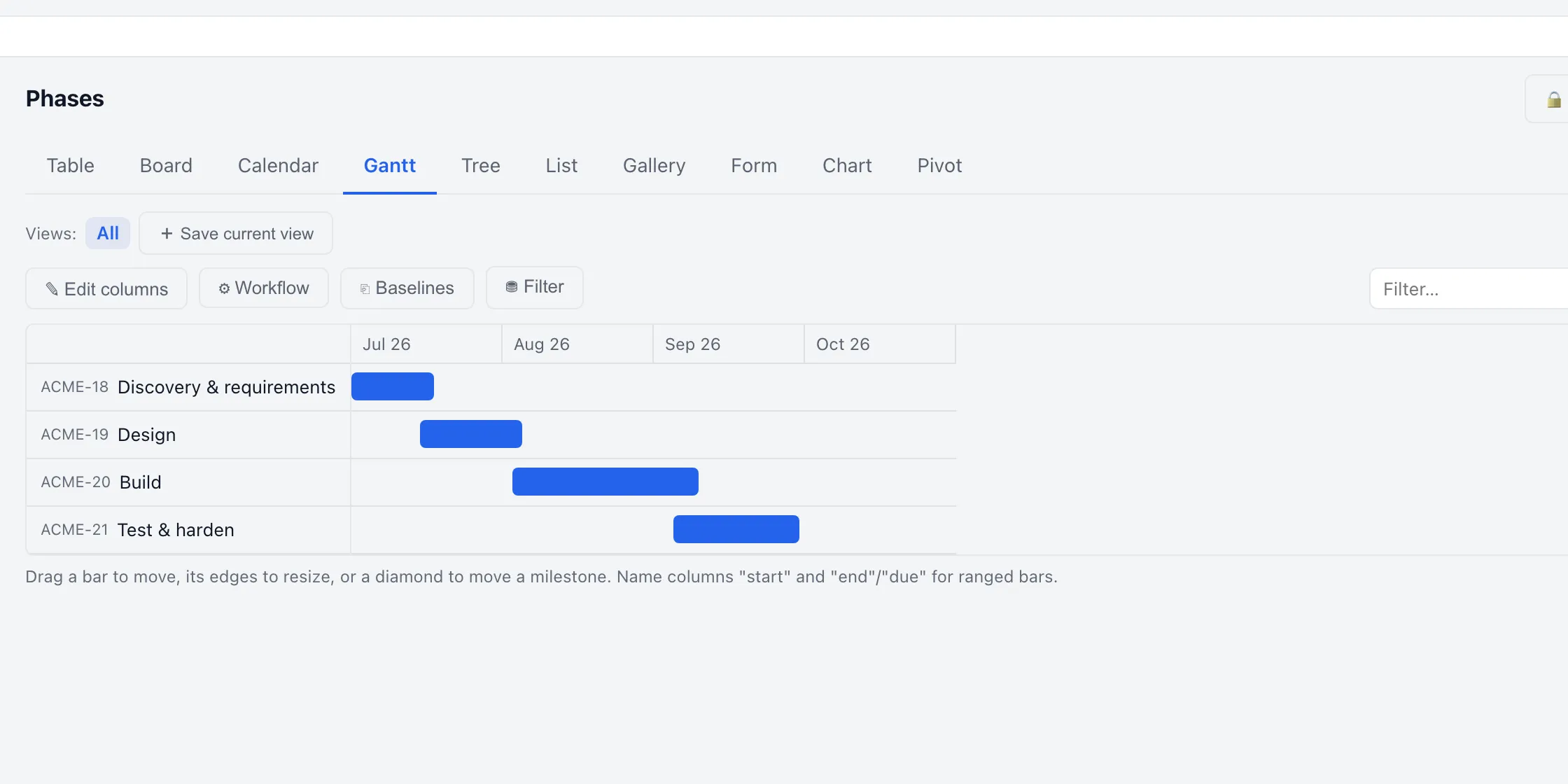
Project phases as a Gantt chart, with tabs for table, board, calendar and other views

Bring your Confluence content with you.

Replacing a knowledge platform is difficult if migration means manually recreating years of documentation.

swCollab can import an existing Confluence space from an export or connect directly to a Confluence installation.

Confluence Cloud

Connection using site URL, space and appropriate credentials.

Confluence Data Center

Connection using site URL, space and supported authentication.

Export file

Import supported Confluence XML/HTML exports.

Preserve the structure and content that matters.

  • Page hierarchy
  • Page order
  • Page content
  • Labels
  • Comments
  • Attachments
  • Blog posts
  • User mentions where mapping is possible
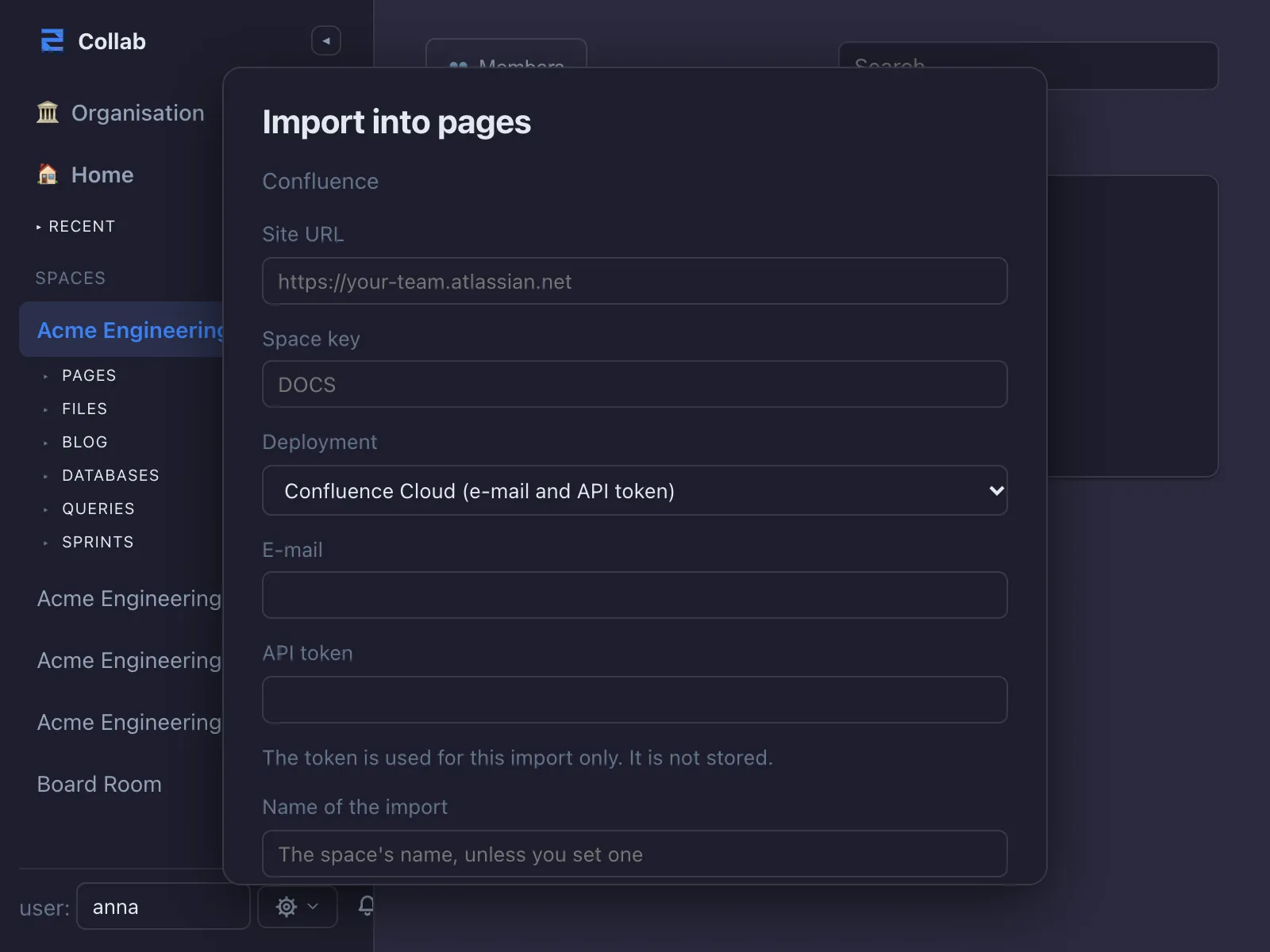
The Import into pages dialog, set to read from Confluence over its API, with fields for site URL, space key, deployment, e-mail and API token

What about Jira?

swCollab currently does not provide automatic Jira project migration.

Links to Jira issues contained in imported Confluence pages remain links; they do not automatically become swCollab tasks.

Teams recreate their delivery workflow in swCollab using boards, tables, timelines/Gantt views, custom fields and workflows.

To bring existing work items across, export them from Jira as a CSV file and import it into a swCollab database: a mapping step shows where each column lands before anything is written.

Hosted when you want convenience. Self-hosted when you need control.

Choose convenience or control, on the same platform.

Use swCollab as a managed service or deploy it on infrastructure you choose.

The product experience remains the same.

For organisations with sensitive information, Restricted and Sealed Spaces provide additional cryptographic separation. Sealed Spaces are available when you self-host.

See Security →

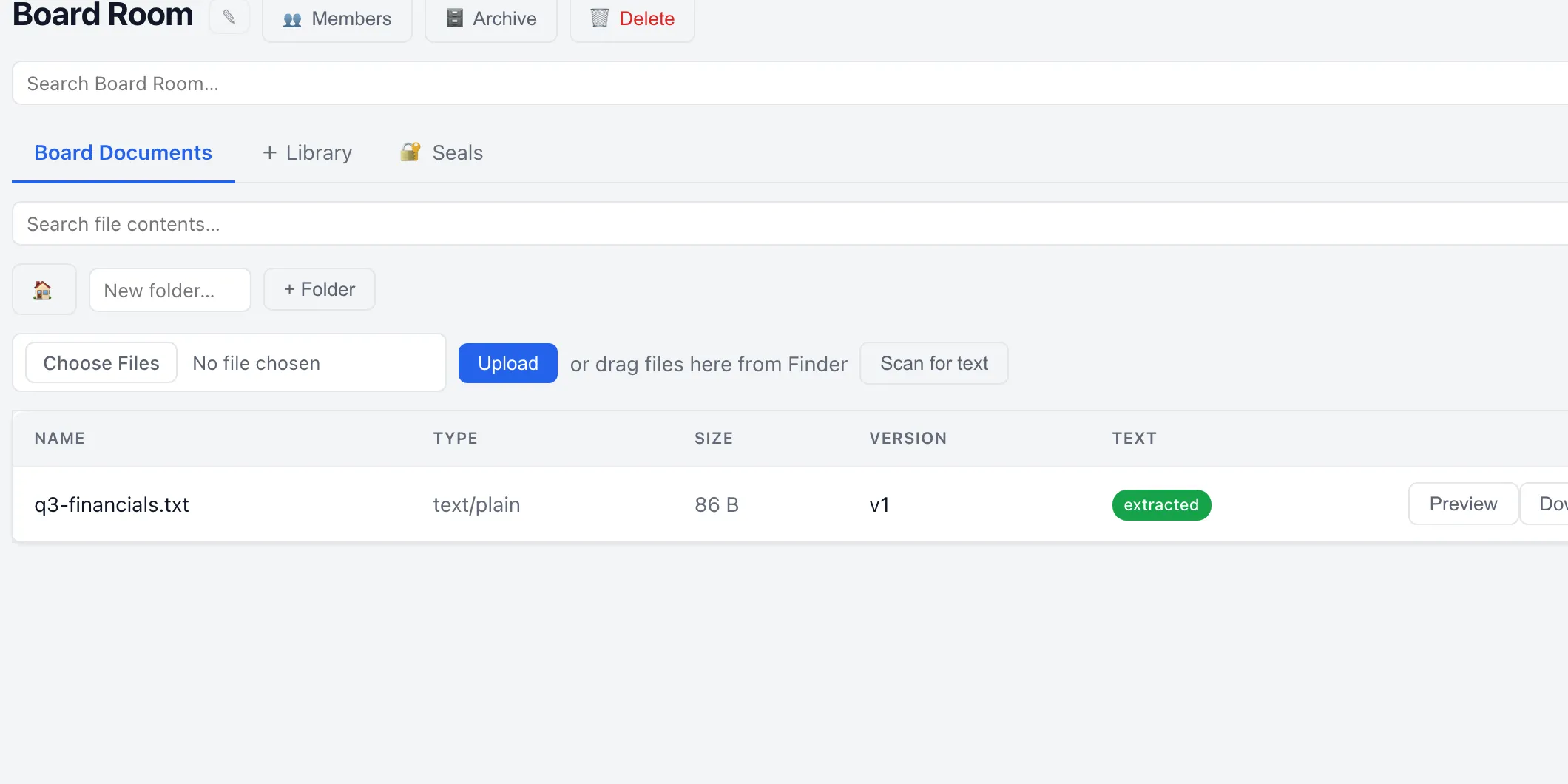
A restricted Board Room space with its own document library

Why consider switching?

Reduce tool fragmentation

Documentation, work, files and requirements live together.

Keep documentation current

Embed live work data instead of copying status manually.

Add traceability

Connect requirements, implementation, tests and evidence.

Control deployment

Use hosted swCollab or self-host it.

Reduce lock-in

Use standard infrastructure and storage technologies.

Simplify licensing

One platform rather than purchasing multiple product categories.

When should you stay with Jira and Confluence?

swCollab may not be the right replacement if:

  • you rely heavily on Atlassian Marketplace apps that have no swCollab equivalent
  • you need a mature Jira-specific integration not currently supported
  • your workflows depend on Jira automation capabilities not available in swCollab
  • automatic Jira migration is a requirement
  • your organisation has standardised globally on the Atlassian ecosystem

swCollab is worth evaluating if:

  • you want documentation and work on one data model
  • requirements and traceability matter
  • you want self-hosting
  • data location/control matters
  • you want to reduce the number of separate work-management systems

Why not just use Confluence and Jira together?

For many organisations, that is a perfectly reasonable choice.

Atlassian provides strong integration between the two products.

The reason to consider swCollab is different: instead of connecting a documentation product to a work-tracking product, swCollab stores documentation and structured work on the same platform.

Confluence + Jira

  • mature ecosystem
  • extensive Marketplace
  • strong Jira/Confluence integration
  • two specialised applications
  • application-specific project/space configuration
  • additional tools may be needed for specialised requirements traceability

swCollab

  • documentation and work on one platform
  • one shared search experience
  • structured requirements/test traceability
  • self-hosted option
  • managed option
  • common record views
  • Confluence content import
  • Jira automatic project migration not currently available
Capability Confluence + Jira swCollab
Wiki/documentation Yes Yes
Task/project management Jira Built in
Jira/Confluence integration Yes — Jira work items on pages, embedded boards, lists and timelines, links from work items to pages Not applicable — same platform
Shared underlying records Separate apps Yes
Requirements traceability Via configuration, Marketplace apps or specialist tooling Built in
Test-to-requirement relationships Additional tooling or configuration, for example Xray or Zephyr Built in
Multiple views of same records Jira: board, list, timeline, calendar, summary Table, board, calendar, Gantt, tree, list, gallery, chart, pivot
Confluence import N/A Yes
Jira automatic project import N/A No — not currently
Self-hosting Data Center: not sold to new customers since 30 March 2026; end of life 28 March 2029 Yes
Managed cloud Yes Yes — public beta
Marketplace ecosystem More than 7,000 app listings No app marketplace; REST API with scoped tokens, and webhooks
Source review Not included with Cloud; Data Center licence holders can request parts of the source Enterprise customers with high security requirements
Data sovereignty options Cloud data residency on Standard, Premium and Enterprise plans, 11 locations Self-host on infrastructure you choose, or managed hosting

Atlassian facts checked on 28 September 2026 against Atlassian's own documentation: Data Center end of life, data residency, requirements management in Jira, Jira and Confluence together. Products change — verify with Atlassian before you decide.

Predictable self-hosted licensing

swCollab self-hosted licensing is structured by company size rather than requiring separate Confluence and Jira subscriptions.

For some team sizes, consolidating tools can reduce software and administration costs.

See swCollab pricing →

See the difference in the product.

swCollab runs directly in the browser. No installation is required for the public demo.

Explore documentation, project views, requirements and traceability yourself.

The public demo uses shared accounts. Do not store confidential information in it.